


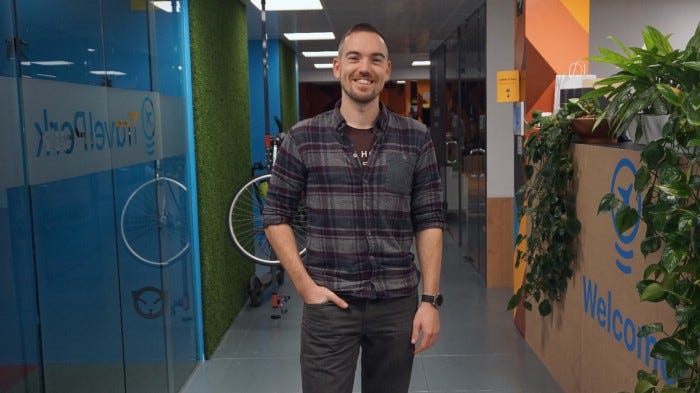
OK, so first a little background — I work as the Design Lead at TravelPerk, a high-growth, travel platform for businesses. Last week was the first week we ran a fully-fledged Design Sprint, where I acted as Moderator.
I’m here to share my learnings for others to hopefully benefit from and expand on.
Not familiar with Design Sprints? I suggest checking out the official Design Sprint website before continuing.
Preparation is key
Sounds obvious, right? It was to me too — however, the exact amount of time you’ll need for preparation is what caught me by surprise. You see a Design Sprint isn’t just the 5 days you run it, as marketed. It’s closer to 6 by the time you factor in all the extra work that’s required.
Share the work
By assigning roles and leaning on your team you’ll keep them more engaged throughout the week. This will also leave you free to focus on the big picture and make sure everything is falling into place. Keep checking in though, to make sure they understand what is being asked of them and if they need any help.
Get a room!
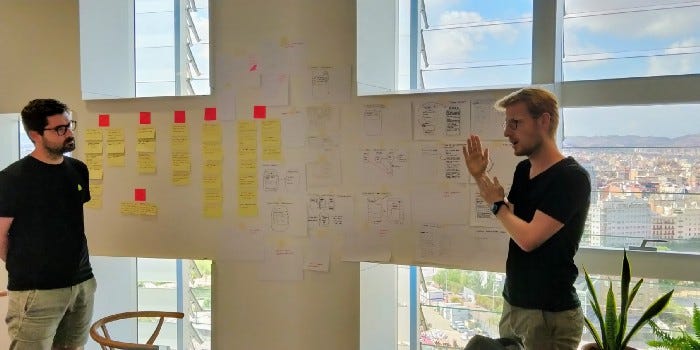
Initially, we had rooms scattered around the office, because blocking one for a whole week is a monumental task. I took it on, and after a solid morning of chasing people up and rearranging other people’s meetings, we had secured our “War Room”.
It should go without saying, but having the same, consistent place is fundamental. The walls become a shared brain which is highly generative of new ideas and discussions. Do not fold on this one.
Prepare your people
A fundamental part of a Design Sprint is the “Ask the Expert” step on day one. Given that these people are experts, they likely have other things to be getting on with, so treat their time as the valuable resource that it is.
In sending out my email to our Experts, I made it clear:
What was the Design Sprint and why were we doing it
Which profile of customer were we going to be focusing on for the week
Which sorts of questions we’d cover on the day, inviting them to share any relevant resources
What the expectation was, and how much time it would take
The next email blast that I sent was to part of our Sales team asking for their help to get hold of some potential customers for Friday’s prototype test. I had done this one week before the sprint to give enough time to organize and track all the potential companies we could speak with and organize these into our database of user testing recruits.
Time is key
With so much packed into one week, it is imperative that you keep a check on the time. I used the Red Hot Timer Mac App and beamed this to the TV in the room. This was blown up to fill the screen and used as a reminder that we have a lot of stuff to get through.
This also proved a really useful tool during the “Ask the Experts” sessions as it kept conversations flowing and on-point. I would highly recommend this. As a bonus, it has a nice UX feature where it sits readily available in your toolbar, so it’s really easy to set the next block of time without having to shuffle through applications.
Monday Madness
It has to be said that Monday was by far the most intense. I believe this is for a couple of reasons. Firstly, day one requires you to wrangle a whole bunch of people from different parts of the business, and secondly, you haven’t yet found your rhythm. In a Design Sprint, you will likely be working alongside colleagues you don’t normally work with. This introduces new team dynamics and challenges you to find a style of moderation that gets the best out of this newly-formed sprint team.
Day one is also the day you realize if you have forgotten anything. Apart from some trivial setup, I had managed to prepare all the necessities: Post-its, markers, tape, paper, whiteboard pens and erasers, voting tabs, coffee machine, fruit, and snacks.
I arrived a little early to get things set up and to write out a couple of things on the whiteboard. These were:
The agenda for the day with some loose times to help keep us on track
The vision for the product we are building, as well as the profile of the customer that we want to focus on
The rules: “No laptops or phones. ABC — Always Be Capturing!”
With those key pieces of information always visible, it was super easy to orient everyone around what was important and keep the team focused.
End-of-day synthesis
With so much information being shared in one day, I stayed back to organize all of the findings from our “Ask the Expert” sessions on one wall, grouping them by theme and highlighting keywords on each Post-it. This way it could be easily referenced whenever one of the team wanted to zoom in on a particular area.
In doing so, it also helped me to digest some of the key themes of the day in a more quiet part of the day. As the moderator, you are often too caught up in the day’s agenda and planning the next step to truly absorb what is being shared at that moment.
One thing I would have improved on day one
The map. Why? When it came to mapping out the experience we looked at time-based events and everyone owned a section of time, adding the steps that they thought relevant to the time slots.
It was a great exercise for sharing understanding and also onboarding new people, however, the end artifact became a little busy and difficult to follow. It still served a great purpose, as we were easy to have the map pinned under the whiteboard during each of the “Ask the Experts” sessions which meant that as the “How Might We…” ideas were flowing, we were able to stick these above the relevant part of the map.
Top tips when kicking things off
As some key takeaways, I’d like to share some tips from each day. Here are my tips for day one:
Recruit your colleagues and delegate certain tasks to help the week run more smoothly and to unburden yourself. This will also help to get the rest of the team engaged.
When reaching out to people for help, reach out early — people are busy and have holidays, etc. Do not leave this to the last minute.
Play music. Many parts of the sprint involve thinking (read: quiet) time. Silence can be awkward, so just having a backdrop of low-volume music can help break any social anxiety. We kicked off with this Spotify playlist.
Create a “temp-design-sprint” Slack channel. This was done for two reasons: to have a digital forum for people to drop in anything relevant that could not be captured on paper and post-its; and also to have a channel where you could ping people about any important updates.
Add “headings” to your Post-it note groups. After identifying affinities, grab a different colored Post-it, give that group a title and then stick this on top of the group once you have removed them from the wall. This will let you unpack the Post-its onto a new wall whilst keeping track of which ones belong to which group.
Check out the full, official guide to running a sprint. I printed out the key parts for each day and had the relevant day visible on the table for anyone to review and see what was coming next and to also keep people focused if I had to leave the room.
Thoughts?
Did you enjoy this article? Give it a clap 👏
Do you have any questions? Drop a comment below 💬
Want to keep in touch? You can find me on LinkedIn or Twitter
