



Data. (noun) — information that is stored by a computer.
Often when we visit websites or online applications, we don’t tend to think all that much about where the content on the screen comes from. It just appears right? The source of website content can come directly from site owners, content writers, and editors or it can be consumed through API (Application Programming Interface) services or databases.
When content is directly created or edited there is an immediate understanding of what the impact of that content will have on the UI (User Interface). In the case where our website or application consumes data from an external source, or where the creators of content are somewhat detached from the front-end display of that content, we immediately create a chain with many links in it.
Structure is king
The data which we retrieve from external sources can fall into two types of categories — structured and unstructured. In the case of structure, there is generally a very clear hierarchy of data where items are related to each other using various taxonomies and metadata. For example, a hotel property being retrieved from an API may share the same street as another hotel. If this data is structured we should be able to see the constituent parts of the address and therefore create relationships between each item as we see fit.
If we look at the two examples below, we can begin to see ways in which we can manipulate the data on the front end to best meet the needs of our users and adapt our designs to work with the data.
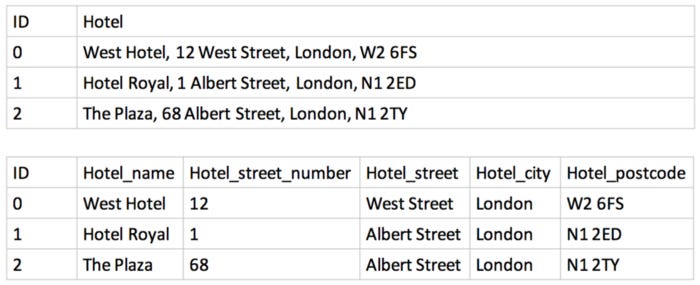
In the first table, if we look at an example of three hotels (which would be taken from a much larger dataset) we would be able to show the names and addresses of each hotel, but it would be very difficult for us to style this data on the front-end. Say, for example, we wanted to have the hotel name as an H2 and the address in a small tag — we would have to somehow apply complex logic to try and work out where the hotel name and address are split. Depending on how the information has been put into the system, the format of each hotel and address could vary a lot and would not necessarily be reliable.
Looking at the second table, however, we could take each of the constituent parts and use these anywhere within our designs as we can call on the specific data item we wish to retrieve. Maybe we just want to show the city in which the hotel is or the street name. Maybe we want to add line breaks for the address at the correct points. We can do all of this. We can now also see that the 2nd and 3rd hotels are on the same street. If the user was looking to stay near a particular location, we could begin to show nearby hotels depending on the one which he or she is looking at. This is just a very simple example, but hopefully, you can begin to see that by understanding the structure of the content, we can start to explore new ways of formatting or interacting with it.
Yeah, but I’m a designer though!
Me too! I just happen to like getting into all of these details, and you should too — because your design WILL depend on it. How many times have you created a design which has not quite worked out as you hoped? Some details are missing or the format is off. This could be because the data is not sent in a way that allows your design to be realized. Rather than just accepting the incompatibility with your design, if discovered early enough in the process, you may be able to speak with your back-end team to see if there are ways in which you can break up the data before it gets to the front end.
How to get started
Whilst it may not be the easiest thing to get your hands on the data, let alone make sense of it, you should start by asking some questions. Speak to the back-end team that manages the database, or to the front-end team that consumes the APIs. Find out what sorts of data you have at your disposal and what format it is stored in. Get familiar with JSON (JavaScript Object Notation) formatting and simple data structures like key-value pairs and arrays. Understanding this will allow you to read the data and develop a better understanding of how you can use the data in your designs.
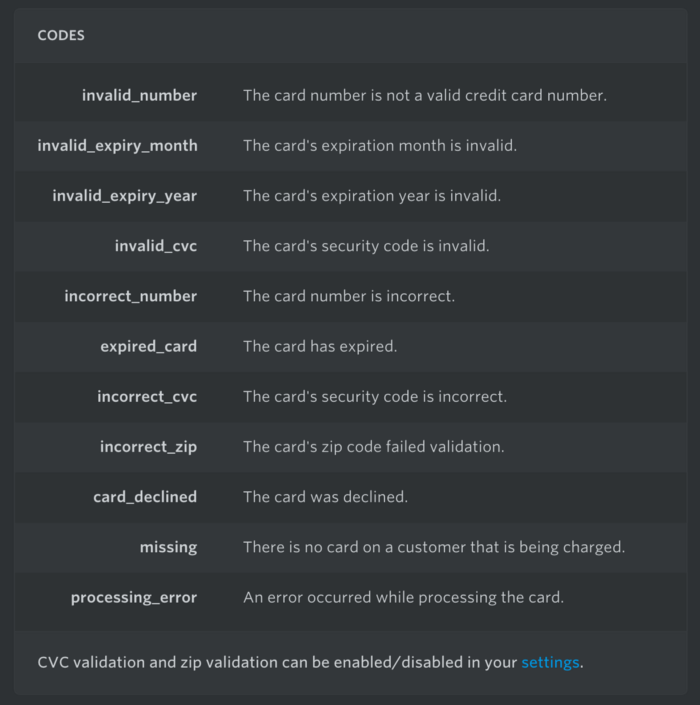
Another great resource can be the API documentation which, if consuming an external service, should be available from the API provider. Let’s assume your product or app uses Stripe for payments and you are tasked with designing the UI for the payment section. You may not consider all of the error states which may be returned by Stripes API. By digging into their documentation, you can quickly get access to all of this information (and more). This can then be used to inform the different states and interactions required by your UI. Things that may have otherwise been overlooked if you had not looked into the API.
Another example could be that you are wanting to create a portfolio from your work on Behance or Dribbble. By referring to their documentation you can see what sort of information you can get on each of your projects, on your profile, and on the other stats related to that project. You may not use all of the information returned, but at least now you can see exactly what sorts of data are there to be used.
Dipping your feet in
Rather than dipping your proverbial toes in, if you want to take it that step further and get your feet wet you could look into tools like Handlebars or Jekyll and start experimenting with a UI built from data. I have written and discussed my views on designers’ coding, and you can read one of these articles here: Designers, fill the gaps, don’t grow a horn
I realize that this may be beyond some designer’s comfort zone, which is OK, as merely having the understanding of data will immediately make you a better designer, but if you have a bit of time to kill why not try and write a few lines of code — you might just enjoy it.
Data, data everywhere
The amounts of data we store, and subsequently consume, is huge! These volumes are only going to get bigger and bigger as more and more devices and people become “connected”. Data is now an integral part of so many aspects of our life: searching for flights for your next holiday; deciding someone’s suitability for store credit; working out on which lap to bring in the Formula 1 car to the pit stop.
Many of the decisions which are made each second are driven by data, and as data itself becomes more ubiquitous in each and every part of our lives, our relationship and consumption of this data is something which we need to become very efficient at. With so much information out there, in so many different forms, it is our duty as designers to make sense of it to the rest of the population. Now is the time to get comfortable and to start understanding the data which surrounds us, for it’s only going to get bigger.